
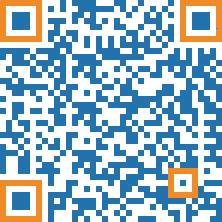
Scan this QR code to learn 7 ways to increase the scan rate of your QR codes.
Did you know that you can scan the above QR code even if you
are browsing this web page on your phone? All modern phones
have a built-in feature that allows you to scan QR codes
from saved images. So, if you take a screenshot of a QR code,
you can scan it from that image afterward.
On iOS: The "Live Text" feature must be turned on via
Settings > General > Language & Region > Live Text. Then,
you can open your Photos app, select an image with a QR
code, and long-press the QR code to invoke a context menu.
On Android: You can use the native "Scan QR code" tool in
your Quick Settings. Swipe down twice from the top of your
screen, find the "Scan QR code" tile, and tap it. Inside the
scanner, tap the small image/gallery icon at the bottom to
select an image with a QR code from your gallery. Once
selected, adjust the scanning frame if needed, and tap "Done"
to scan the code and open a context menu.
Don't scroll down the page. Scan the QR code ;-)
Introduce your QR code with a heading that clearly
communicates its value for your viewers. A common
approach to explain the benefits of using
a QR code is to rely solely on the call-to-action, but that is
often too late. Without an introductory
heading, the very first thing your audience sees is an
abstract graphic that they don't understand. This may
cause a negative emotion that stops further interaction
immediately. Try this test: Go to a colleague, only
say "Hakoras benkisi awireg oti selkaja mikotimo?",
and analyze the reaction.
Unfortunately viewers regularly experience
that QR codes are used to promote low value offers.
This makes a high value signal upfront even more important.
Don't just write "Scan Me" or "Download" as your call to action.
These short commands too often offer too little information to
effectively guide your viewers through their next steps. Generally,
people prefer to be addressed with proper sentences. If you can
repeat the value proposition from your header as a small reassurance,
all the better. In our example at the beginning, we wrote: "Scan
this QR code to learn 7 ways to increase the scan rate of your
QR codes."
If your design space is absolutely limited, for example, on a small
flyer, try to at least take it one step further:
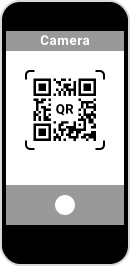
Many people still don't know how to scan a QR code
and those individuals benefit immensely from a short,
clear explanation of the mechanics. You could try adding
an explanatory sentence directly to your call-to-action,
but there is a much better way. Instead of crowding your
text, use a simple instructional illustration that
people can process at a glance. To help you out,
you can download our smartphone vector from
above for free and use it directly in your own
layouts. smartphone-to-scan-a-qr-code-vector-image.zip
One could write an entire masterclass on styling a
QR code, but don't go bananas. While you can lightly
adapt a code to match your brand colors or tuck a
clean logo in the center, remember that over-customizing
it isn't the magic lever to increase your scan rate. In
fact, keeping your QR code close to its classic, high-contrast
look also has its advantages because the average viewer instantly
recognizes it for what it is. Treat brand styling as a subtle
touch, not an art project that sacrifices readability.
Every time someone scans a QR code, they learn a lesson
about whether the experience is actually worth their time.
If the scan leads to a slow, low-value, or disappointing
webpage, they train themselves to ignore future codes.
But if the content meets or even surpasses their expectations,
the experience feels rewarding. That positive reinforcement
builds long-term trust, turning a hesitant scanner into
someone who is far more likely to engage the next time they
spot a code.
While a website URL QR code is the default choice, relying
on it for every single situation overlooks a massive boost in
utility. By matching your physical medium with a specialized
QR code type, you elevate the value of the information you're
handing over. For instance, if you are handing out a flyer for
an event, use an event QR code so users can instantly save
the date and set a reminder in their native calendar. If you're
printing a corporate brochure, a vCard QR code lets people
drop your name, phone number, address, and website directly
into their phone's address book. When a user scans a code and
seamlessly triggers a native smartphone function like an
automatic calendar save or an instant contact card, they
experience a small moment of tech-enabled delight. That positive,
friction-free impression builds a favorable opinion of QR codes
overall — making them much more likely to trust and scan
another code in the future.
There are still many people who don't fully understand
why QR codes are useful or how they can be interacted
with. If you take the opportunity to provide a little context or
light instruction within your own materials, you aren't just
helping your own campaign, you are actively contributing
to public QR code literacy. By participating in QR code education,
you can help increase future scan rates for everybody.
